Blog

  • Beyond Coding: Why AI Model Training is Tech’s Newest High-Income Skill

    The tech landscape has shifted completely this year. For decades, learning to code was the only clear path to a high-income tech career. If you did not know software engineering, you were locked out of the best tech opportunities.

    Artificial intelligence changed the rules. AI systems now write code at an incredible pace. This shift has created a massive demand for a completely different human capability.

    Tech companies are no longer just looking for people to build applications. They are desperately hunting for professionals who can refine intelligence. This has made AI model training the newest and most accessible high-income skill in the digital economy.

    The Shift From Software Creation to Intelligence Refinement

    Large language models do not emerge smart out of the box. A raw neural network cannot communicate effectively with humans. It cannot write reliable legal documents, diagnose technical errors, or handle financial data without human guidance.

    This is where specialized optimization becomes critical. Human operators must grade AI outputs. They correct factual errors, rewrite flat responses, and supply nuanced training data. This workflow guides the model toward human-level accuracy.

    Why Tech Giants Value Human Evaluation Over Raw Code

    Anyone can prompt an AI to generate text or code. But raw generation lacks safety, brand voice, and deep contextual logic. Human training ensures that systems remain unbiased, accurate, and completely safe for consumer deployment.

    Why AI Model Training is the Perfect Alternative to Traditional Tech Roles

    If you want to break into the tech sector right now, this new domain offers massive structural advantages over software development:

    • Low Entry Barriers: You do not need to spend months memorizing complex programming languages. Your primary assets are analytical thinking, clear logical reasoning, and a sharp eye for detail.
    • High Financial Upside: Basic data annotation pays entry-level rates. However, advanced domain training for specialized fields commands excellent hourly compensation across global platforms.
    • Remote Work Independence: AI developers build these networks globally. They hire decentralized, remote teams to evaluate systems from anywhere in the world.

    How to Build Your Training Portfolio and Land Premium Contracts

    The market for baseline data collection is highly competitive. To maximize your earning power, you must position yourself as an expert rather than a general laborer. You need to understand advanced concepts like Reinforcement Learning from Human Feedback.

    Platforms utilize strict vetting filters. If you fail their baseline qualification assessments, you will not access the top tier of payment tasks. Knowing the core evaluation principles gives you an instant advantage.

    Conclusion

    The era of traditional tech gatekeeping is coming to an end. You do not need a computer science degree to earn a premium digital income in 2026. By learning to optimize artificial intelligence, you position yourself at the very center of the current tech boom.

    Recommendation

    Do not attempt to pass competitive platform screenings without preparation. If you want a structured learning path to master these precise verification concepts, check out the specialized certifications available at the AI Trainer Academy. Proper instruction will fast-track your path to high-paying remote contracts.

  • Looking for a Remote Tech Side Hustle? Why You Should Consider AI Data Annotation

    The search for a reliable remote side hustle is harder than ever. Freelance markets are crowded. Traditional tech roles often require years of coding experience.

    If you want a flexible way to earn from home, a new sector is growing fast. AI data annotation has become one of the best remote tech side hustles available today. Tech giants and startups are pouring billions into artificial intelligence.

    But these models cannot learn on their own. They need humans to teach them.

    Here is why this side hustle is booming and how you can get started.

    What is AI Data Annotation?

    AI data annotation is the process of labeling data. This data can be text, images, videos, or audio.

    Think of it like teaching a child. If you want an AI to recognize a car, you must show it thousands of images of cars. A human data annotator labels those images. You draw boxes around the cars, tag the traffic lights, or label the pedestrians.

    For text models, it might involve reading an AI response. You check it for accuracy. You flag bias or harmful content. This human feedback shapes how smart the AI becomes.

    Why Data Annotation is the Perfect Side Hustle

    The demand for high-quality training data is skyrocketing. This creates a massive opportunity for remote workers. Here is why it stands out:

    1. No Coding Required

    You do not need a computer science degree. You do not need to know Python or JavaScript. If you are detail-oriented and computer literate, you can do this job.

    2. Ultimate Flexibility

    Most annotation platforms let you log in whenever you want. You can work late at night, early in the morning, or during weekends. It fits perfectly around a day job.

    3. Steady Demand

    AI companies need millions of data points every single day. The work is continuous. As long as companies build new AI models, they will need human annotators.

    How Much Can You Earn?

    Earnings vary based on your location, the platform, and your skill level.

    Basic tasks like image tagging might pay lower hourly rates. Complex tasks like evaluating coding outputs or linguistic analysis pay much higher.

    Many remote workers use this as a steady secondary income stream. The key to unlocking the highest-paying tasks is specialized training.

    How to Stand Out in a Competitive Market

    Because the barrier to entry is low, many people apply for these roles. Platforms use qualification tests to filter out applicants. If you fail the test, you do not get the work.

    To land the best contracts, you need to understand the underlying concepts. You need to know how models process information. You must understand guidelines for accuracy and consistency.

    Recommendation

    Do not jump into platforms blindly. Prepare yourself first. If you want to pass qualification tests on top platforms, look into structured training.

    You can get certified and learn the exact skills platforms look for at the AI Trainer Academy. Taking a dedicated course gives you a massive advantage over untrained applicants.

    Conclusion

    AI data annotation is more than just a temporary trend. It is the backbone of the modern tech economy. It offers a genuine, flexible way to earn income remotely without needing advanced tech skills.

    If you have a laptop, a stable internet connection, and a sharp eye for detail, this hustle is waiting for you. Spend some time learning the ropes, choose the right platforms, and start building a future-proof side income today.

    TAKE YOUR FIRST DATA ANNOTATION TEST TASK HERE

  • The Remote Worker’s Cybersecurity Checklist for 2026

    When you work from home, you are your own IT department. There is no network firewall between you and the internet, no security team monitoring your traffic in real time, and no colleague to ask does this email look suspicious to you? You are the first and often only line of defence.

    That reality has made remote workers the most targeted group in cybercrime. In 2025, 92% of IT professionals reported that remote and hybrid work had increased cybersecurity threats at their organisations. Data breaches involving a remote work factor cost companies an additional .07 million on average compared to office-based breaches, according to IBM’s Cost of a Data Breach Report.

    The good news: the vast majority of attacks on remote workers are preventable. Not with expensive enterprise software, but with a consistent set of habits and a handful of free tools. This checklist covers all of them.
     

    43%of initial breach attempts in remote environments start with phishingElectroIQ, 2026.07Madditional average cost of a breach when remote work is a factorIBM Cost of a Data Breach, 202529%of remote workers use public Wi-Fi for work without a VPNAxis Intelligence, 2026

    Why remote workers are the #1 target in 2026

    Corporate offices run on layered security infrastructure, enterprise firewalls, managed devices, 24/7 monitoring, and IT teams who can isolate a compromised machine within minutes. When you work from home, almost none of that exists.

    Your home router almost certainly runs older firmware with known vulnerabilities. Your personal devices may be shared with family members or used to browse non-work sites that carry malware risks. And your email inbox receives the same sophisticated, AI-crafted phishing attempts as a Fortune 500 executive, without the enterprise spam filter catching them first.

    In 2025, 38% of all cyberattacks targeted home routers, VPNs, and other remote access methods. Remote desktop protocol misuse accounted for 11% of unauthorised access incidents. And 73% of remote employees admitted to using personal devices for work-related tasks at least once per week, devices that in 44% of cases were involved in a security breach.

    The threat landscape has also changed in 2026. Attackers no longer need to write convincing phishing emails manually. AI tools now generate personalised messages using data scraped from your LinkedIn, social media, and public email addresses, making it increasingly difficult to spot a fake by tone alone. Voice cloning tools can impersonate your manager in a phone call. Setting up a team safe word for any out-of-the-ordinary requests is now a real security practice, not a far-fetched precaution.

    The checklist: 10 things to do right now

    Work through this list from top to bottom. Items 1 to 5 are non-negotiable. Items 6 to 10 are additional layers that significantly reduce your risk exposure.

    1

    Secure your home Wi-Fi

    Log into your router admin panel (usually 192.168.1.1 in your browser), change the default admin password, set your Wi-Fi encryption to WPA3 or WPA2, and update the router firmware. Then create a separate guest network for work devices. This isolates your laptop from smart TVs, games consoles, and other household devices that could be compromised.

    Takes 15 minutes. Protects your entire home network.  

    2

    Use a VPN on every non-home network

    On your own secured home network, a VPN is optional. But the moment you open your laptop in a coffee shop, hotel, airport lounge, or coworking space, you need one active before you do anything work-related. Public Wi-Fi networks are fundamentally insecure. Attackers on the same network can intercept unencrypted traffic. Proton VPN offers a reputable free tier with no data limits. NordVPN and ExpressVPN are the leading paid options.

    Non-negotiable on any public or shared network.  

    3

    Enable passkeys or MFA on every work account

    Credential theft is the number one initial access vector for attackers. Even a strong password can be phished or leaked in a breach. Adding a second factor means a stolen password alone is useless to an attacker. Organisations with mandatory MFA for all remote access see 86% fewer credential-based breaches. Start with your email and your company’s main platforms. Passkeys are the strongest option available in 2026. They cannot be phished and do not require you to remember anything.

    Single highest-impact security action you can take today.  

    4

    Use a password manager

    62% of security breaches in 2025 were due to poor or stolen credentials. The root cause is almost always password reuse. A password manager generates a unique, strong, random password for every account and stores it securely. You only need to remember one master password. Bitwarden is free, open-source, and highly rated. 1Password and Dashlane are strong paid options with additional breach monitoring features.

    Free option available. No excuse not to use one.  

    5

    Keep all devices and software updated

    Unpatched software is one of the most common entry points for malware and ransomware. Enable automatic updates on your operating system, browser, and all work applications. This applies to your router firmware too. If your employer manages your device, never delay or dismiss update prompts. Those patches often fix actively exploited vulnerabilities. In 2025, 22% of remote work security incidents involved unpatched personal devices.

    Turn on auto-updates. Never dismiss them.  

    6

    Lock your screen every time you step away

    An unlocked laptop in a coffee shop or shared workspace takes three seconds for someone to access your email, files, or systems. On Windows, press Windows + L to lock instantly. On Mac, use Command + Control + Q. Set your device to auto-lock after 2 minutes of inactivity in your display settings. If you work from home with family members around, this matters there too.

    Set auto-lock to 2 minutes in your display settings now.  

    7

    Use a dedicated work device where possible

    73% of remote employees use personal devices for work at least once a week. Personal devices often run software your employer has not vetted, share storage with personal files, and may be used by other household members. If your company provides a work device, use it exclusively for work. If you must use a personal device, set up a separate browser profile for work. Never install unapproved apps or browser extensions on the device you use for work.

    Separate browser profile is a quick and practical middle ground.  

    8

    Treat every unexpected link or attachment with suspicion

    Phishing is responsible for 43% of all initial breach attempts in remote environments and in 2026, AI-generated phishing messages are indistinguishable from genuine ones by tone alone. If you receive an unexpected request via email, Slack, or Teams, even from a name you recognise, verify it through a separate channel before clicking anything. Call the person. Send a new message. Never click verify your account links in an unsolicited email. Go directly to the site by typing the URL yourself.

    Verify unexpected requests through a second channel before clicking.  

    9

    Back up your files using the 3-2-1 rule

    Ransomware attacks on remote workers increased 29% in 2025. The 3-2-1 backup rule is the industry standard: keep 3 copies of important data, stored on 2 different types of media, with 1 copy stored off-site or in the cloud. For most remote workers, this means using a cloud backup service like Google Drive or Backblaze and periodically copying critical files to an external hard drive. Test that your backups actually restore. A backup you have never tested is not a real backup.

    Set up automatic cloud backup today. Test it once a month.  

    10

    Know your company’s incident response plan

    Find out now who to contact at your company if you think you have been hacked. What is their email or phone number? What do they need from you immediately? Save this information somewhere accessible, not just on the potentially compromised device. If you are a freelancer or solo worker with no IT team, bookmark the CISA incident reporting page and know to disconnect from the internet first before doing anything else.

    Find out who to call before you need to call them.  

    The tools worth using in 2026

    You do not need to spend a lot of money to be well protected. Here are the best options by category, with a free and paid choice for each.

    New threats remote workers face specifically in 2026

    Beyond the evergreen risks above, 2026 has introduced a set of threats that did not exist or were not yet practical even two years ago. 

    AI-powered spear phishing

    Attackers now use AI to scrape your LinkedIn, social media, and company website, then generate personalised phishing emails that reference your actual projects, colleagues, and clients. These messages are grammatically perfect and contextually convincing. The only reliable defence is to verify unexpected requests through a second channel, always.

    Deepfake voice calls impersonating your manager

    With as little as 30 seconds of audio scraped from a video call, attackers can clone a person’s voice and call you claiming to be your manager, requesting urgent action such as a wire transfer or sharing credentials. Establish a team safe word for any out-of-the-ordinary requests. If the caller cannot provide it, hang up and call back on a known number.

    Shadow IT and AI tool data leaks

    46% of business owners reported concerns about sensitive data being entered into AI tools like ChatGPT or Gemini by employees. When you paste a client contract, internal strategy document, or customer data into an AI assistant, that data may be used to train the model or stored on external servers. Never paste sensitive company data into any AI tool that has not been explicitly approved by your employer’s IT or legal team.

    Unsanctioned app usage

    Remote workers frequently install personal productivity apps, browser extensions, or cloud storage tools without IT approval. These unapproved apps can introduce vulnerabilities, send company data to unvetted servers, or create unmonitored access points into company systems. When in doubt, ask IT before installing anything on a work device.

    Important reminder

    Cybersecurity is not a one-time setup. It is an ongoing habit. Threats evolve monthly. The checklist above is your baseline, not a ceiling. Schedule a 30-minute security review every quarter: update your passwords, check for breach alerts on haveibeenpwned.com, review which apps have access to your accounts, and re-read your company’s security policy for any updates.

    Security training reduces phishing click rates by 65% when conducted quarterly. If your employer offers cybersecurity training, complete it.

    Is remote work safe in 2026?

    Verdict

    Yes, if you follow the checklist. Remote work is not inherently less safe than office work, but it does transfer more security responsibility to the individual. The ten steps above eliminate the vast majority of risk that remote workers face. MFA alone blocks 86% of credential-based breaches. A VPN on public networks stops traffic interception. Updated software closes the doors attackers most commonly use. None of these steps require technical expertise or significant expense. The gap between a well-protected remote worker and a vulnerable one is almost entirely a matter of habit, not hardware.

    Start with steps 1 through 5 today. They take under two hours total and give you the most protection per minute invested. Then work through the remaining five over the coming week. By the end of it, you will be significantly better protected than the majority of remote workers, and you will have done it without spending a penny.

    Frequently asked questions

    What are the biggest cybersecurity risks for remote workers in 2026?

    The biggest risks are phishing attacks (responsible for 43% of initial breach attempts in remote environments), unsecured home Wi-Fi, use of personal devices for work, unpatched software, and AI-powered social engineering attacks including voice cloning. Remote workers are 3 times more likely to encounter phishing than office-based employees.

    Do I need a VPN if I work from home?

    On your own secured home network, a VPN is optional. However, you absolutely need one any time you connect from a public or shared network such as a coffee shop, hotel, airport, or coworking space. 29% of remote workers connect to public Wi-Fi for work without a VPN, putting company data at serious risk of interception.

    What should I do if I click a suspicious link at work?

    Act immediately: disconnect your device from the internet by turning off Wi-Fi or unplugging the ethernet cable, do not enter any passwords or credentials on any page that opened, notify your IT or security team right away, and do not restart the device until instructed. The faster you report it, the better your team’s chance of containing any damage before it spreads.

    Is public Wi-Fi safe for remote work?

    No. Public Wi-Fi networks are fundamentally insecure. Attackers on the same network can intercept unencrypted traffic using tools that are freely available. If you must use public Wi-Fi for work, always connect through a reputable VPN first. Never access banking, company systems, or sensitive files on public Wi-Fi without a VPN active.

    How do I know if my work accounts have been compromised?

    Warning signs include unexpected login notifications or emails you did not trigger, password reset emails you did not request, unfamiliar activity in your sent folder, colleagues reporting strange messages from your account, or unexpected MFA prompts. Check haveibeenpwned.com to see if your email address has appeared in any known data breaches.

    What is the most important security step a remote worker can take?

    Enable phishing-resistant multi-factor authentication, ideally passkeys, on every work account. Organisations with mandatory MFA for all remote access see 86% fewer credential-based breaches. Credential theft is the number one initial access vector for attackers, and MFA stops the vast majority of these attacks before they can cause damage.
  • The AI Safe Word: The Only Strategy That Actually Stops Deepfake Voice Scams

    It’s 7:00 PM on a Tuesday. Your phone rings. It’s your daughter’s voice. She’s crying, sounds panicked, and says she’s been in a minor car accident and needs 0 for a tow truck immediately. Her voice is unmistakable—the same pitch, the same um between words, even the same slight rasp she gets when she’s stressed.You’re about to open your banking app when something feels off. You ask her the name of the family dog. The voice on the other end pauses, then hangs up.You weren’t talking to your daughter. You were talking to a 30-second audio clip someone scraped from her Instagram and ran through a -a-month AI cloning tool. In 2026, this isn’t science fiction; it’s the standard operating procedure for modern scammers.

    The Science of the Clone

    Earlier in the decade, deepfakes required massive computing power and hours of data. Today, an AI agent only needs about three seconds of audio to create a near-perfect digital twin of your voice. These tools can then take any typed text and speak it in your voice with 99% accuracy, including your specific accent and emotional inflections.Because we are biologically wired to trust the voices of our loved ones, these Emergency Scams have a much higher success rate than traditional phishing emails.

    The Solution: The 3-Step Safe Word Strategy

    At Tech Daily, we believe the best defense against high-tech scams is a low-tech solution. You don’t need expensive anti-virus software to beat a voice clone; you need a Family Safe Word.

    1. Choose Your Word (or Phrase)

    Sit down with your inner circle—parents, children, and partners. Choose a word or a short phrase that is easy to remember but impossible to guess.

    • Bad: Your dog’s name, your street, your favorite sports team. (These are usually on social media).
    • Good: A specific inside joke, a made-up word, or an obscure childhood memory.
    • Example: Blue Pineapple or Remember the rainy taco night?

    2. Establish the Protocol

    Make it a rule: If anyone in the family calls from an unknown number—or even their own number—asking for money, a password, or sensitive info, the Safe Word must be used. If the caller can’t provide it, or tries to talk around it (I’m too stressed to remember that right now!), hang up immediately.

    3. The Call Back Rule

    Scammers often use spoofing to make the caller ID look like it’s coming from your loved one’s actual phone. Even if the voice sounds right, tell them, I’ll call you right back on your number. A scammer cannot intercept a direct call you initiate to the real person’s device.

    Why Human Verification is the Future of Security

    As AI continues to blur the line between real and synthetic media, we have to stop trusting our eyes and ears by default. In 2026, we are entering the Era of Zero Trust. This doesn’t mean being paranoid; it means being prepared.Your digital identity—your voice, your face, your likeness—is now a public asset. While tech companies are working on digital watermarking to identify AI content, those systems are still in their infancy. For now, the most secure firewall is the one you build with your family at the dinner table.The take-away for today? Pick your word. Tell your circle. And never let a digital clone bypass your human intuition. 

  • What Is an AI Agent? How to Automate Your Work in 2026 (No Coding Required)

    AI agents go beyond answering questions — they take action. Here’s what they are, why they’ve gone mainstream in 2026, and how to start delegating tasks to one today without writing a single line of code.

    Quick answer

    An AI agent is software that can autonomously plan and complete multi-step tasks — browsing the web, accessing your apps, and making decisions — to achieve a goal you set in plain language. Unlike a chatbot, which answers questions, an agent takes action. In 2026, no-code platforms like Zapier Central and Microsoft Copilot Studio make agents accessible to non-developers.

    By 2023, most people had gotten used to chatting with AI. By 2024, the novelty had worn off. The fundamental problem was clear: if you still had to copy-paste responses between tools, the AI had only created a new kind of busywork.

    That’s the gap AI agents are designed to close. Instead of giving you information and waiting for you to act on it, an agent acts on your behalf — across your email, calendar, files, and third-party apps — until the job is done.

    38%of knowledge workers now use some form of AI automation weeklyMcKinsey Digital, 2026
     2.9 hrsaverage time saved per day reported by regular AI agent usersAsana State of AI Work, 2026.1Bprojected no-code AI automation market size in 2026Grand View Research, 2025

    Chatbot vs. AI agent: what’s the actual difference?

    The simplest way to understand the distinction is with a concrete example. Ask both a chatbot and an agent the same goal: I need to book a flight to Tokyo under 0 in October.

    That last row is key. An agent’s defining quality is autonomy — it can operate between your instructions rather than waiting for the next prompt.

    Why 2026 is the inflection point

    Agents aren’t a new concept — the term has existed in AI research for decades. What changed in the past 18 months is that three separate capabilities converged at the same time:

    Reasoning over retrieval. Modern large language models don’t just predict the next word — they can work through a multi-step plan, identify when something isn’t working, and choose an alternative approach. This is sometimes called chain-of-thought or agentic reasoning.

    Reliable tool use. Current models can now call external APIs and apps with far fewer errors than earlier versions. Connecting an AI to your Gmail or Notion workspace is now a configuration task, not an engineering project.

    Local and private execution. Small language models (SLMs) — compact AI models that run on a laptop or phone — mean that many agentic workflows no longer require sending your private data to a cloud server. This removes a major adoption barrier for business users.

    The shift from AI-as-assistant to AI-as-worker is the most consequential change in how knowledge work gets done since email. — a useful framing for why this moment matters

    How to set up your first AI agent (no coding required)

    You don’t need engineering experience to start. The following five steps will get a functioning agent running on a real workflow within an afternoon.

    1. Identify your “digital friction”

    Look for tasks where you regularly move information from one place to another: downloading email attachments and filing them, turning meeting notes into action items, or checking multiple inboxes for a specific type of message. Any repetitive data-transfer task is a strong candidate.

    2. Choose a no-code orchestration platform

    Zapier Central and Microsoft Copilot Studio are the leading no-code options as of early 2026. Both let you describe what you want in plain English and connect your existing tools through pre-built integrations. Zapier suits individual users and small teams; Copilot Studio is better suited to organisations already in the Microsoft 365 ecosystem.

    3. Set human-in-the-loop guardrails first

    Before the agent can send emails, delete files, or take any irreversible action, configure it to request your approval. This human-in-the-loop setting is standard in most platforms and is the single most important safety practice for new users.

    4. Start with a read-only, low-stakes workflow

    A good first task: have the agent summarise your unread emails each morning and surface anything flagged as urgent. This requires only read access and produces a visible, reviewable output — perfect for building trust in the system before granting write permissions.

    5. Expand permissions gradually

    Once the agent consistently handles simple read tasks correctly, extend its access in stages: first calendar writes, then email drafts (with your approval before sending), then file organisation. Treat each expansion as a probationary period with a one-week review.

    The security risks you need to know about

    Security note

    Prompt injection is the most significant risk for AI agent users. It occurs when a malicious piece of text — hidden in a webpage, email, or document the agent reads — tricks it into taking an unintended action (such as forwarding sensitive files or approving a payment).

    Mitigation: Always require biometric or explicit user approval for any action involving money, external email, or file deletion. Use platforms that support sandboxed execution — meaning the agent operates in an isolated environment and cannot make changes without explicit authorisation.

    The second risk is what practitioners call agentic sprawl — multiple agents optimising independently, triggering each other’s actions in loops. For example, a travel agent books a flight, which prompts a work agent to reschedule a meeting, which prompts a social agent to message your contacts about your availability. Keep agents operating in separate, non-overlapping domains until you have confidence in each one individually.

    Is it worth it for the average person?

    For any professional who spends more than two hours a day on repetitive information tasks — email triage, scheduling, report drafting, data entry — the answer is yes. The setup cost for a simple agent is now measured in hours, and the payoff compounds across every working week.

    For casual users, the honest answer is: it depends on your tolerance for initial configuration. Agents are not yet zero-setup. The learning curve is real, and the first few workflows will require iteration. But the tools are meaningfully easier to configure in 2026 than they were in 2024, and that trajectory is continuing.

    The useful mental shift is from thinking of an agent as a tool you use to thinking of it as a role you’re filling. You’re not operating software; you’re onboarding a new member of your workflow. The first week is training. After that, it runs itself.

    Frequently asked questions

    What is an AI agent?

    An AI agent is a software system that can autonomously plan and complete multi-step tasks using tools like web browsing, email, calendars, and third-party apps — without a human directing each step. Unlike a chatbot that only responds to questions, an agent acts on goals.

    What is the difference between an AI chatbot and an AI agent?

    A chatbot responds to a single prompt and returns a text answer. An AI agent receives a goal, breaks it into steps, uses external tools (web search, apps, APIs), and completes tasks across multiple actions — for example, finding a flight, booking it, and adding it to your calendar in one run.

    Can I use an AI agent without coding?

    Yes. Tools like Zapier Central and Microsoft Copilot Studio let you set up AI agents by describing what you want in plain language. No programming is required. Both platforms offer free tiers to get started.

    Are AI agents safe to use?

    AI agents are safe when configured with proper guardrails. Best practices include enabling human-in-the-loop approval for sensitive actions (sending emails, spending money), using agents that support sandboxing, and starting with read-only access before granting write permissions.

    What tasks can an AI agent automate?

    Common use cases include inbox triage, invoice processing, meeting scheduling, report summarisation, social media drafting, customer support routing, and data entry across platforms. Any task that involves moving or transforming information between apps is a strong candidate for automation.

    ALSO READ:- How To Build An App With AI + No Coding in 2026 (FULL COURSE)

  • The Invisible Wearable War: Smart Rings vs. Smartwatches

    Smart Rings vs. Smartwatches in 2026: Do You Still Need a Screen on Your Wrist?

    We’ve reached a tipping point in 2026. For years, the smartwatch was the undisputed king of the wrist, a glowing slab of glass that tethered us to our digital lives. But the winds have shifted toward invisible tech trends.

    Miniaturization has finally caught up to our ambitions. The sensors that once required a bulky casing now fit inside a band of titanium no thicker than a wedding ring. As we look at the best smart ring 2026 options, the question isn’t just about what looks cooler—it’s about whether you actually need a computer strapped to your arm anymore.


    The Case for the Smart Ring (The Invisible Contender)

    The smart ring has graduated from a niche sleep tracker to a legitimate powerhouse. In 2026, models like the Oura Ring 4 and the Samsung Galaxy Ring 2 have refined their internal architecture to offer 24/7 biometrics without the gadget aesthetic.

    The biggest draw remains the set it and forget it lifestyle. While watch users are hunting for puck chargers every night, smart ring battery life in 2026 has stabilized at a solid 7 to 10 days. You put it on, and you live your life.

    • Oura Ring 4: The gold standard for data accuracy and recovery scores.

    • RingConn Gen 3: The champion of the no-subscription model, proving you shouldn’t have to pay a monthly fee to see your own heart rate.

    • Samsung Galaxy Ring 2: Deeply integrated into the Android ecosystem with gesture controls that actually work.

    Best For: Minimalists, sleep junkies, and people who want to wear a traditional mechanical watch without looking like they have two clocks on.


    The Case for the Smartwatch (The On-Wrist Assistant)

    Despite the rise of the ring, the smartwatch isn’t going anywhere—it’s just evolving. The Apple Watch Series 11 and the Galaxy Watch 7 Ultra have leaned into being phone replacements.

    If you are an athlete, a ring simply cannot compete with a screen. Try checking your split times or a topographic map on a piece of jewelry while sprinting—it doesn’t work. The mature app ecosystem and LTE connectivity mean you can leave your phone at home and still be reachable.

    Best For: Power users, outdoor adventurers, and anyone who needs to triage emails or take calls while on the move.


    The 2026 Sensor Showdown: Accuracy & Features

    <p style=animation:auto ease 0s 1 normal none running none;appearance:none;background-color:rgba(0, 0, 0, 0);border:0px none rgb(31, 31, 31);clear:none;clip:auto;color:rgb(31, 31, 31);columns:auto;contain:none;container:none;content:normal;cursor:auto;cx:0px;cy:0px;d:none;direction:ltr;display:block;fill:rgb(0, 0, 0);filter:none;flex:0 1 auto;float:none;font-family:"Google Sans Text", sans-serif !important;gap:normal;hyphens:manual;inset:auto;interactivity:auto;isolation:auto;line-height:1.15 !important;margin:0px !important 0px 16px;marker:none;mask:none;offset:normal;opacity:1;order:0;orphans:2;outline:rgb(31, 31, 31) none 0px;overlay:none;padding:0px;page:auto;perspective:none;position:static;quotes:auto;r:0px;resize:none;rotate:none;rx:auto;ry:auto;scale:none;speak:normal;stroke:none;transform:none;transition:all;translate:none;visibility:visible;

  • Beyond the Hype: Is the AI PC Finally Worth Your Money in 2026?

    Beyond the Hype: Is the AI PC Finally Worth Your Money in 2026?

    Let’s be honest: for the last two years, AI PC felt like a marketing term looking for a purpose. We saw stickers on laptops and dedicated Copilot keys that mostly just opened a web browser. But as we move through 2026, the landscape has shifted. We’ve moved from Cloud-First AI to Local-First Agents, and suddenly, the hardware inside your laptop actually matters again.If you’re sitting there with a perfectly functional 2023 MacBook or a 13th-Gen Intel rig, you’re likely asking the ,500 question: Do I actually need a dedicated NPU (Neural Processing Unit), or is this just another 3D-TV fad?

    The 50 TOPS Threshold: Why 2026 is Different

    In 2024 and 2025, we talked about TOPS (Trillions of Operations Per Second) like they were sports stats. But in 2026, we’ve hit the magic 50 TOPS threshold across the board—from Qualcomm’s latest Oryon cores to the refined Intel Lunar Lake and AMD Strix Point architectures.The difference today isn’t that your Excel sheets open faster. It’s that your PC is finally quietly smart.Previously, if you wanted to run a local Large Language Model (LLM) to summarize a sensitive 50-page PDF, your fans would spin up like a jet engine and your battery would tank in forty minutes. Today’s NPUs handle these inference tasks with a fraction of the power. We are seeing 18-hour battery lives while running local background agents that categorize your emails, edit your video lighting in real-time, and scrub your audio—all without ever sending a single byte of data to an external server.

    Local Privacy: The Unsung Hero of the AI PC

    Privacy has become the luxury good of 2026. With the rise of Agentic AI—tools that don’t just chat but actually do things—giving an AI access to your files is a massive security risk if that AI lives in the cloud.The 2026 tech stack allows for On-Device Intelligence. When you use a tool like AutoDev or LocalMind, the thinking happens on your silicon. For developers, lawyers, and healthcare professionals, this isn’t just a cool feature; it’s a compliance requirement. If your blog audience is tech-savvy, this is the angle they care about: Owning your intelligence instead of renting it from a subscription service.

    The Rise of the Invisible Agent

    The biggest change we’ve noticed this year is that AI isn’t a destination anymore; it’s a layer.In our testing at Tech Daily, we’ve seen the shift from Chatbots to Invisible Agents. On a modern AI PC, your operating system is constantly predicting your next move. If you have a Zoom call at 2:00 PM, your NPU has already pre-cached the relevant documents, optimized your camera’s background blur, and prepared a live-transcription engine that works offline.This anticipatory computing is where the NPU shines. It handles the small, constant tasks that used to bog down the CPU and GPU. By offloading these to the NPU, your main processor stays cool, meaning your laptop doesn’t throttle when you actually need to do heavy video editing or gaming.

    The Wait or Buy Dilemma

    So, should you pull the trigger? Here is our 2026 breakdown: 

    • Buy Now If: You are a creator who uses Adobe Creative Cloud or DaVinci Resolve. The NPU-accelerated masking and tracking tools are now 4x faster than CPU-only versions.
    • Buy Now If: You work with sensitive data and want to use local LLMs (like Llama 4-Light) for daily workflow automation without cloud latency.
    • Wait If: You are a casual user who mostly stays in a Chrome browser. While Google is integrating more AI into the browser, a 2024 laptop still handles web-based AI perfectly fine.

    Verdict: The Spec That Finally Matters

    For a decade, we bought PCs based on Ghz and RAM. In 2026, the most important line on the spec sheet is the NPU Efficiency.The AI PC isn’t about making your computer a genius; it’s about making it an efficient partner. It’s about a computer that doesn’t get hot when you’re multitasking and doesn’t die halfway through a cross-country flight just because you were using advanced features.The hype is finally dead, replaced by something much better: Utility. If your current machine feels dumb or loud, 2026 is the year the upgrade finally feels like a leap forward rather than a small step.


  • Telegram Username Scam  -  Be Vigilant

    It started like a regular day at around noon when I got the first message on Telegram.

    Hey.

    I was surprised because the message was from a strange account. I was skeptical, but I decided to respond, and I replied, “Hello.”

    Within a few seconds, I got the next message,

    Hey, just wanted to ask – are you open to discussing @Scofield_eth

    I was taken aback and asked what it was about.

    The reply was

    I want to buy your username.

    I can offer a good price

    At this point, I began to piece together what the conversation was about, and I quickly searched for information on whether selling Telegram usernames was a thing.

    It was, so I responded, What is your offer?

    The response was

    I’m offering 3,000 TON

    Quite strange why the offer was so high and why me, I immediately knew something was fishy, and I decided to see what the end game was.

    I responded that 3000 TON was not ok, I asked for 5000 TON and after a few back and forth, we agreed. on 4000 TON.

    Next, I got this message

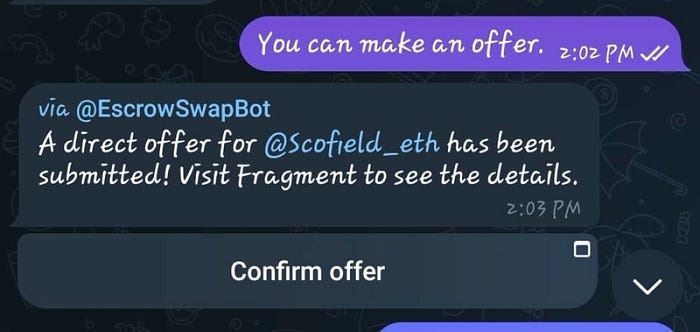
    I use Fragment for the transaction.

    Have you heard of it?

    I responded, I knew about it, and I got another message, and at that point, the plot thickens.

    Before I share what happened next, check out our telegram channel where we share everything spanning across all tech domains. The one stop for everything Tech.

    I got this link.

    0*XuPySgbD8XXRHtFj.jpeg

    To understand how crafty the scam was, you need to understand how fragment works.

    Telegram Fragment Name Selling — Simplified

    Telegram allows users to buy and sell unique usernames (called fragments) on its platform through a marketplace called Fragment.

    Main Component:

    • Username NFTs: Each Telegram username is turned into an NFT (digital asset) on The Open Network (TON) blockchain.
    • Buying/Selling: Users can buy, sell, or auction these usernames on the Fragment site using TON cryptocurrency.
    • Ownership: Once bought, the username is yours. You can use it on Telegram or resell it later.

    As a rule, I do not click on links I am unsure of, but I decided to go along to see what happens. I told the contact that I had to auction the name, and they had to bid for it, but I was quickly rebuked with the following.

    That’s because I don’t work with auctions, but through a direct transaction.

    So please open the link and let’s make a deal.

    My next move was to use another phone, click on the link, and download a TON wallet, as that was the only way I could complete the transaction.

    I knew I could not use any wallet with real TON, so I don’t get wiped out.

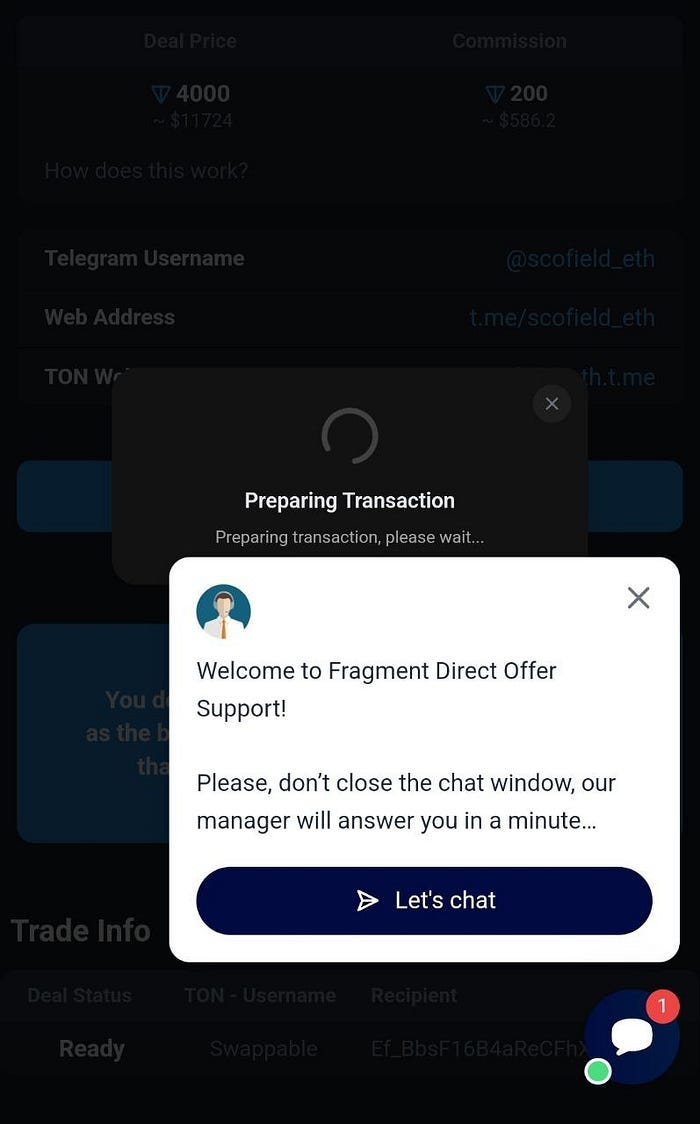
    First thing I noticed after clicking is the site looked sketchy, but that was not the light bulb moment.

    It was showing Preparing transaction.

    0*o3m1uUiL8-9ulrgd.jpg

    I asked why the transaction was pending, and I was told

    try to connect another wallet or write to support

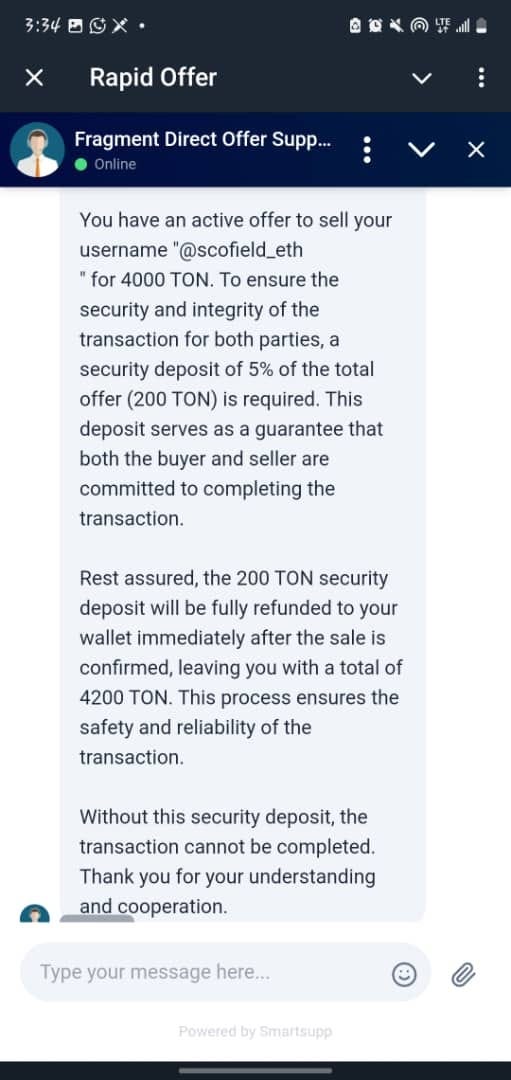
    Be informed that when you click the scammer’s link, the support page does not close, which means they want you to speak with support.

    Here is how the conversation went.

    0*HiXunRQq62t9JLQT.jpeg

    I knew it was likely the same person or part of their team.

    0*USonIwGl7T9kVS0I.jpeg

    At this point, I knew I was being scammed, so I continued playing along to see what would happen and to gather information.

    0*DftiqgFD1jaYSgdy.jpeg

    Remember, I was using an empty wallet, and I knew if there were funds, there was a high likelihood that clicking the link and signing the transaction could empty it.

    I knew this was the end.

    But to conclude my investigation, I went back to the chat on Telegram to inform the scammer that I won’t be paying.

    I got this reply

    What’s your problem? It’s a security deposit for the transaction. But I pay the commission, and your deposit and my money go back to you

    I was informed that once I fund my account, I would also receive my initial deposit of 200 TON plus the 4000 TON.

    I told him to minus the 200 TON from the payment as I won’t be paying it.

    I got another sketchy response

    0*qQa6WrS4dHb6wYjQ.jpg

    They sent me this with the message

    my money is frozen for the transaction and is waiting for your transaction

    I ended the chat here, but I kept getting messages that I am going to lose money.

    Conclusion

    Scammers are getting smarter, and Telegram username scams are the new trap. What started as a seemingly legitimate offer turned into an elaborate ploy to steal crypto through fake sites and pressure tactics.

    Here’s the takeaway:

    • Never click on unknown links.
    • Never “connect” a wallet with funds.
    • Only use fragment.com for Telegram name sales.
    • And if a deal sounds too good to be true, it probably is.

    Stay sharp. The price of carelessness could be your entire wallet.

  • Insider Info: How to Apply and Ace the Micro 1 AI Interview

    Micro1 has become one of the most talked-about companies in the AI talent space. As a platform that matches top global engineering talent with high-growth technology companies, Micro1 is itself a technology business built around AI — and their hiring process reflects that. If you are preparing to apply, understanding what to expect will dramatically improve your chances.

    What Is Micro1?

    Micro1 is a talent platform that vets and places software engineers, AI specialists, and technical professionals with companies ranging from funded startups to publicly listed technology firms. What makes Micro1 distinctive is their AI-driven vetting process — candidates are evaluated through a structured combination of automated technical assessments and AI-assisted interviews before being presented to client companies.

    For candidates, passing the Micro1 vetting process means access to a curated pipeline of well-paying remote positions. For hiring companies, it means receiving a shortlist of pre-validated talent. Understanding both sides of this equation helps you position yourself effectively.

    Roles Micro1 Typically Hires For

    • Full-stack software engineers (React, Node.js, Python, Go)
    • Machine learning engineers and data scientists
    • AI product managers
    • DevOps and cloud infrastructure engineers
    • Mobile developers (iOS, Android, React Native)

    The Application Process: What to Expect

    The Micro1 process is more structured than a typical job application. Here is what the typical candidate journey looks like:

    Stage 1: Profile Submission

    You submit a profile that includes your CV, portfolio links, GitHub profile, and a short video introduction. The video matters more than most candidates realise — it is your first opportunity to demonstrate communication skills and professionalism. Record it in a quiet, well-lit environment, speak clearly, and be specific about the type of work you do best.

    Stage 2: AI-Assisted Technical Screening

    This is where Micro1 differs significantly from traditional recruiters. The initial technical assessment is administered and partly evaluated by an AI system. You will be given coding challenges appropriate to your stated specialisation — expect algorithmic problems, system design questions, and occasionally live debugging exercises.

    The AI evaluator is assessing not just whether your code works, but how you approach problems — whether you clarify requirements before coding, whether you consider edge cases, and whether you communicate your thinking as you work.

    Stage 3: Human Interview

    Candidates who pass the technical screening move to a human interview focused on communication, professional experience, and cultural fit. This is a conversational interview, not another technical test. Be ready to discuss specific projects in depth, explain technical decisions you made and why, and demonstrate that you can work effectively in a distributed, asynchronous team.

    How to Prepare Effectively

    • Refresh your fundamentals — Data structures, algorithms, and system design basics. LeetCode medium-difficulty problems are a good calibration point.
    • Practise thinking out loud — The AI evaluation watches your process, not just your output. Practise narrating your approach as you code.
    • Polish your portfolio — Have two or three projects you can discuss in depth — the problem they solved, the technical decisions you made, and the measurable outcome.
    • Prepare for asynchronous work questions — Micro1 places candidates in remote positions. Be ready to speak to your experience with async communication, documentation habits, and self-directed work.

    Final Tips

    Honesty about your skill level pays off in the Micro1 process. Their AI screening is designed to identify your actual level accurately — overstating your experience leads to a poor fit placement, which benefits no one. Present yourself accurately, perform to your genuine ability, and you give the platform its best chance to match you with a role where you will thrive.

    The companies on the other side of Micro1’s platform are looking for engineers who can contribute immediately. Preparation, authenticity, and clear communication are what separate successful candidates from the rest.